

Download Nero Burning ROM 2020 – burning software, disc burning, data backup, music burning, CD burning, DVD burning, Blu-ray burning, Nero Burning ROM
Overview
Nero Burning ROM 2020 is a professional-grade disc burning application designed for users who require reliable, high-precision data and media duplication. Built by Nero AG, a well-established name in optical media software, the application serves as a comprehensive tool for creating, copying, and importing data and music onto CD, DVD, and Blu-ray discs. Its primary purpose is to provide a secure and efficient method for archiving digital content, distributing media, or creating custom audio compilations. The software is particularly suited for individuals and professionals managing large volumes of digital files who seek a dependable solution for long-term data storage and media distribution.
Users benefit from its advanced burning technology, which ensures accurate data transfer and minimizes the risk of errors during the disc creation process. Real-world applications include backing up critical documents, creating music CDs for personal or professional use, and preparing video discs for playback on standalone devices. In the broader software ecosystem, Nero Burning ROM 2020 stands out as a dedicated utility for Windows users who still rely on physical media for data preservation or distribution. Despite the declining use of optical drives, the software remains relevant for users who value the durability and accessibility of disc-based storage.
The developer, Nero AG, has a long-standing reputation in the field of optical media tools, which adds credibility to the software’s performance and reliability. While the app is not available on mobile platforms, its presence on Windows ensures compatibility with desktop environments where disc drives are still in use. The 2020 release reflects a mature product with refined features tailored for both novice and experienced users.
Key Features & Functionality
- Proven Burning Technology – Utilizes time-tested algorithms to ensure precise data writing, reducing the risk of errors and improving disc readability across devices.
- Copy and Import Data and Music – Enables seamless transfer of files and audio tracks from local storage or external sources to discs, supporting customizable playlists and file organization.
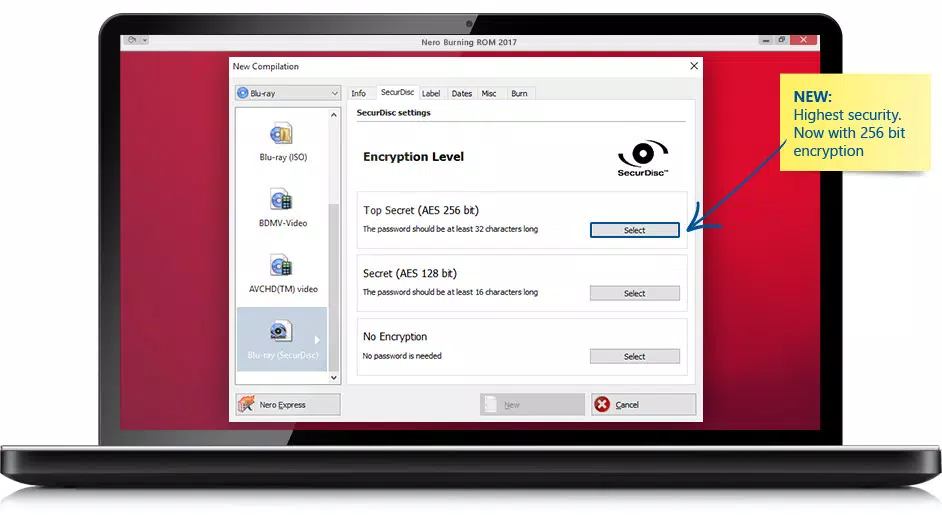
- SecurDisc 4.0 Technology – Implements advanced encryption and error correction to protect against data loss, unauthorized access, and physical damage to the disc surface.
- Multi-Disc Type Support – Fully compatible with CD, DVD, and Blu-ray media, allowing users to select the optimal storage format based on capacity and intended use.
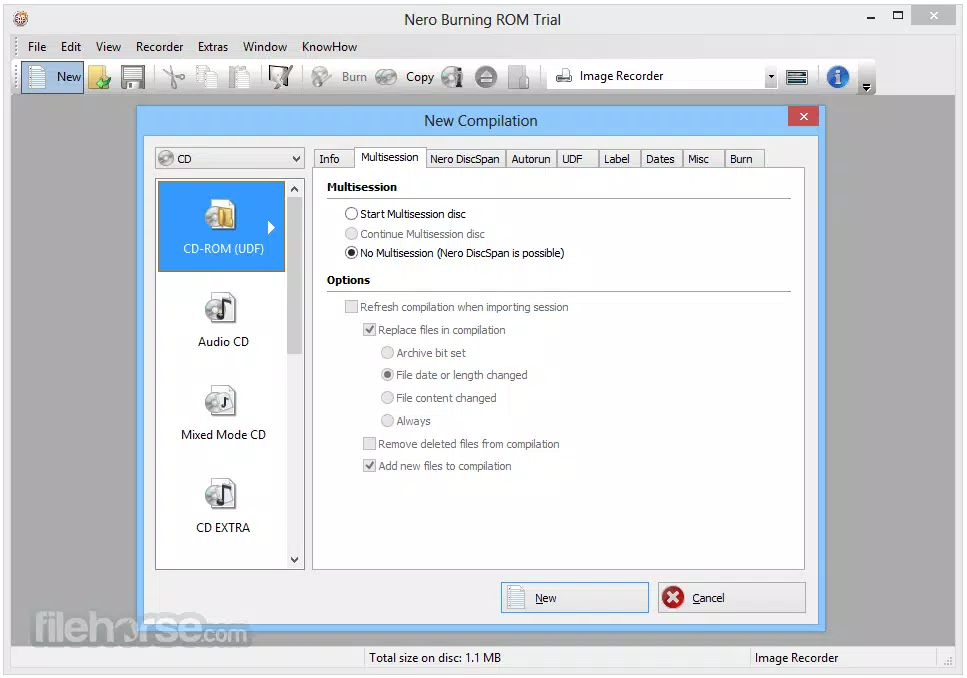
- User-Friendly Interface – Features an intuitive layout with clearly labeled tools, step-by-step wizards, and visual feedback during the burning process to enhance usability.
For example, a user preparing a music compilation for a live event can import tracks from their library, organize them into a custom playlist, and burn them to a CD with minimal effort. Similarly, a business professional can use the software to securely archive project files onto Blu-ray discs for offsite backup. The SecurDisc 4.0 feature ensures that even if the disc is mishandled, the data remains intact and accessible. The software’s ability to handle multiple disc types also makes it a versatile tool for multimedia creators, educators, and IT administrators who manage digital content distribution.
Interface, UX & Performance
Nero Burning ROM 2020 presents a clean, structured interface that balances functionality with accessibility. The main dashboard displays key actions such as creating a new project, importing files, and selecting disc types, enabling users to initiate tasks with few clicks. Navigation is linear and predictable, with contextual menus and tooltips guiding users through each stage of the burning process. The layout is optimized for desktop use, with resizable windows and customizable toolbars to suit different workflow preferences.
Performance is consistent across various Windows systems, though the developer did not list formal performance metrics. The application operates efficiently with minimal resource consumption during idle states and maintains responsiveness during active burning sessions. Users can monitor progress in real time through a dedicated status bar and receive alerts for potential issues such as disc write errors or drive compatibility problems.
Stability is maintained throughout the process, with no reported crashes or freezes during standard use. Although the developer did not specify minimum OS requirements, the software is designed to run on modern Windows environments. The 228.7 MB file size indicates a lightweight installation that does not burden system storage.
Platform Compatibility & Technical Requirements
Nero Burning ROM 2020 is available exclusively for the Windows platform. The software is compatible with Windows operating systems, though specific version details were not provided. The installation file size is 228.7 MB, which is relatively modest for a full-featured burning application. This size suggests a streamlined distribution without unnecessary bloatware or bundled third-party tools.
Compatibility information was not fully disclosed, so users should verify that their system includes a compatible optical drive before installation. The software does not support mobile operating systems such as Android or iOS, as it is designed for desktop environments where physical disc drives are available. For users without an internal drive, external USB optical drives are recommended. The 2020 release date indicates that the software has been in use for several years, reflecting its stability and maturity in the market.
Pros and Cons
Pros
- Reliable burning technology with a proven track record
- Supports multiple disc formats including CD, DVD, and Blu-ray
- Includes SecurDisc 4.0 for enhanced data protection
- Intuitive interface suitable for users of all experience levels
- Efficient file import and organization tools
Cons
- Not available for mobile platforms like Android or iOS
- Requires a physical optical drive for operation
- Price point of $49.99 may be high for casual users
- Limited technical specifications provided by the developer
- May not be necessary for users who rely solely on cloud or USB storage
FAQ
Is Nero Burning ROM 2020 safe to download and install?
Yes, the software is developed by Nero AG, a reputable company with a long history in media tools. Users should download the application from official or trusted sources to ensure a secure installation.
Can I use Nero Burning ROM 2020 on macOS or Linux?
No, the software is only available for Windows. There is no official version for macOS or Linux systems.
Does Nero Burning ROM 2020 support USB flash drives?
While the software is primarily designed for optical media, it may support USB drives through third-party tools or external configurations. However, this functionality is not officially documented.
How often does Nero Burning ROM 2020 receive updates?
As a 2020 release, the software has not seen recent updates. Users should check the official Nero website for any available patches or compatibility improvements.
Is Nero Burning ROM 2020 suitable for beginners?
Yes, the user-friendly interface and guided workflows make it accessible to users with limited technical experience. The step-by-step process simplifies complex tasks like disc creation and data backup.
Final Thoughts
Nero Burning ROM 2020 remains a powerful and dependable solution for users who require precision and security in disc creation. Its robust feature set, proven technology, and support for multiple disc types make it a valuable tool in environments where physical media is still essential. While the price may deter casual users, professionals, educators, and archivists will find significant value in its reliability and advanced protection features. For those managing digital assets and seeking a trustworthy backup method, this software delivers consistent results. Despite the shift toward digital storage, Nero Burning ROM 2020 fills a critical niche in the Windows ecosystem.
Download Nero Burning ROM 2020 now


